Big Idea 2
1. Database Management with SQLite:
“rates” Table Columns, and data management/organization
-
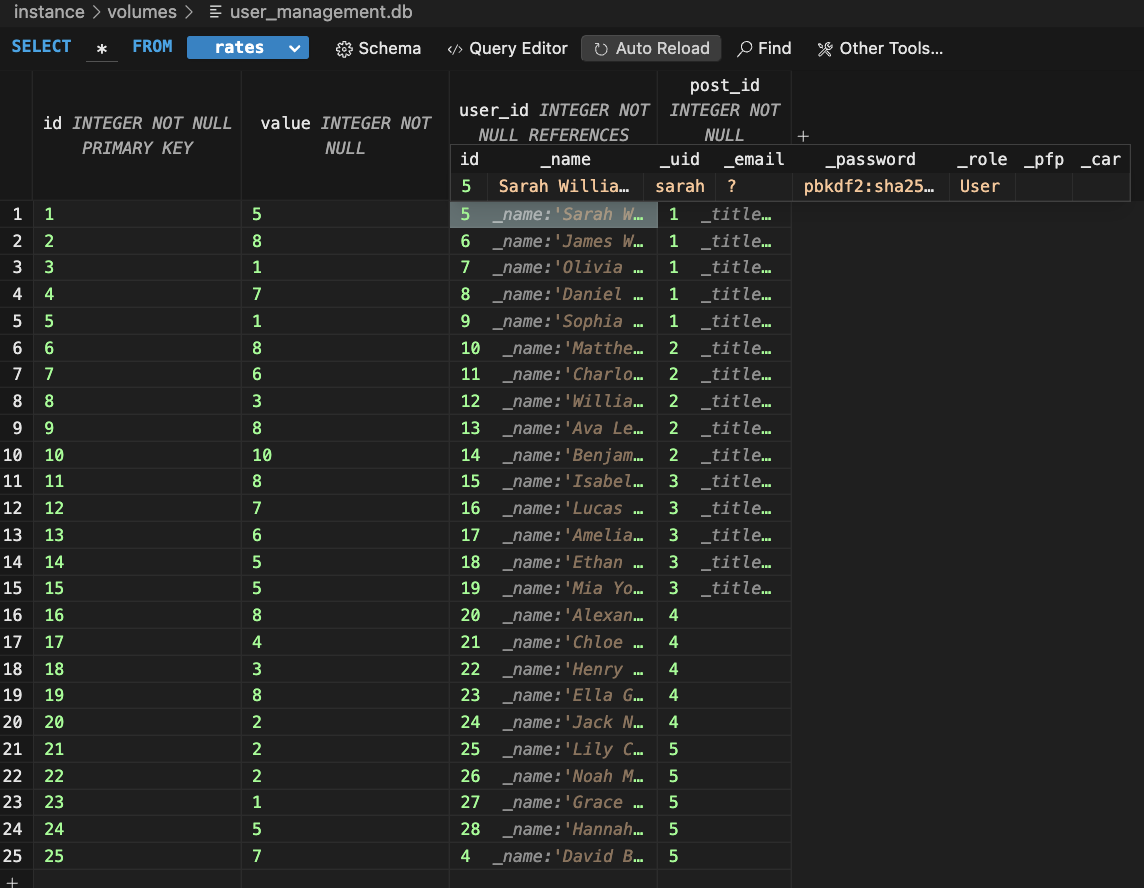
This is my Rate table in the database, which stores a unique rating_id in the first column which is different for each rating.
-
It stores the actual value or “rating” which are integers from 1-10 in one column.
-
It stores the user_id associated with the user that created that rating, and when joined with the user.py api, the username can be found which is associated with each rating.
-
There is also a column for post_id, and each attraction that there is a rating for will have its own post_id, so al the eiffel tower ratings will be in post_id 1, the louvre ratings will be in post_id 2, etc…
__tablename__ = 'rates'

id = db.Column(db.Integer, primary_key=True)
value = db.Column(db.Integer, nullable=False)  # Rating value (1-10)
user_id = db.Column(db.Integer, db.ForeignKey('users.id'), nullable=False)
post_id = db.Column(db.Integer, db.ForeignKey('posts.id'), nullable=False)

def __init__(self, value, user_id, post_id):
    self.value = value
    self.user_id = user_id
    self.post_id = post_id
The Code
In my “rate” api’s model file I have defined the different columns, and where each value that is entered should go on the table, as well as what type of data should be in each.
- For instance, all of my data is stored as integers
2. Data Upload and Storage
Retrieving Data from the Request
def post(self):
    # Retrieve data from the request
    current_user = g.current_user
    data = request.get_json()
    post_id = data.get('post_id')
    rating_value = data.get('rating')
Data(Rating) Validation
# Validate the input
if post_id is None or rating_value is None:
    return jsonify({"message": "post_id and rating are required"}), 400

try:
    rating_value = int(rating_value)
except ValueError:
    return jsonify({"message": "Rating must be an integer"}), 400

if not (1 <= rating_value <= 10):
    return jsonify({"message": "Rating must be between 1 and 10"}), 400
Adding the data to the table
# Create a new rating entry
rating = Rate(user_id=current_user.id, post_id=post_id, value=rating_value)
db.session.add(rating)
db.session.commit()

return jsonify({"message": "Rating submitted successfully"})
-
Takes in data from the request
-
Then, validates whether the rating and other data is valid, and ready to add to the table
-
Adds the data to the table, formatting it into columns with
- user_id
- post_id
- value(rating)
Thus, the rating is successfully added to the table, and linked with the post_id(“eiffel tower”, “louvre”, etc.), and also linke with the specific user_id(user who added the rating).
3. Data Security
if rating.Rate.user_id == current_user.id or current_user.role == 'Admin':
    # Ensure the rating belongs to the current user
    rating = Rate.query.filter_by(id=rating_id).first()
    if rating:
        db.session.delete(rating)
        db.session.commit()
        return jsonify({"message": "Rating deleted successfully"})
    else:
        return jsonify({"message": "Rating not found"}), 404
Users: Admin vs User
This is a code segment from the delete request in my rate API, and it helps create security for the data on the website.
- Only Admin users can delete messages from all user
- Normal Users can only delete their own messages
The same ideas apply to the put(update) method because the update and delete methods are the only ones which modify the existing data, and this can cause data security concerns, because if a nromal user was allowed to delete all the ratings all of the data could be gone, but here only restricted admin users can.
However, anyone can post or get, allowing all users to create ratings and view the current ratings.
@token_required()
Token Required
All users who are trying to access the data, or create a rating, view ratings, update their ratings, and delte their ratings must be logged in, and the token required feature allows for that, and prevents users not logged in from accessing the data.
4. Data Retrieval and Display
Get Request
Retrieve data from the frontend
post_id = request.args.get('post_id')
Validate the data
if not post_id:
    return jsonify({"message": "post_id is required"}), 400
Queries
ratings = db.session.query(Rate, User).join(User, Rate.user_id == User.id).filter(Rate.post_id == post_id).all()
ratings_list = [{"rating_id": r.Rate.id, "username": r.User._name, "rating": r.Rate.value} for r in ratings]

return jsonify(ratings_list
THe code queries through the “rates” table, and returns all of the rating_ids, usernames, and the actual rating values associated with each rating.
Frontend Code
const response = await fetch(`${pythonURI}/api/rate?post_id=${POST_ID}`, fetchOptions);
const data = await response.json();
The code recieves the data associaed with a particular post_id in the backend in the form of a json, which it can then use to display on the frontend.
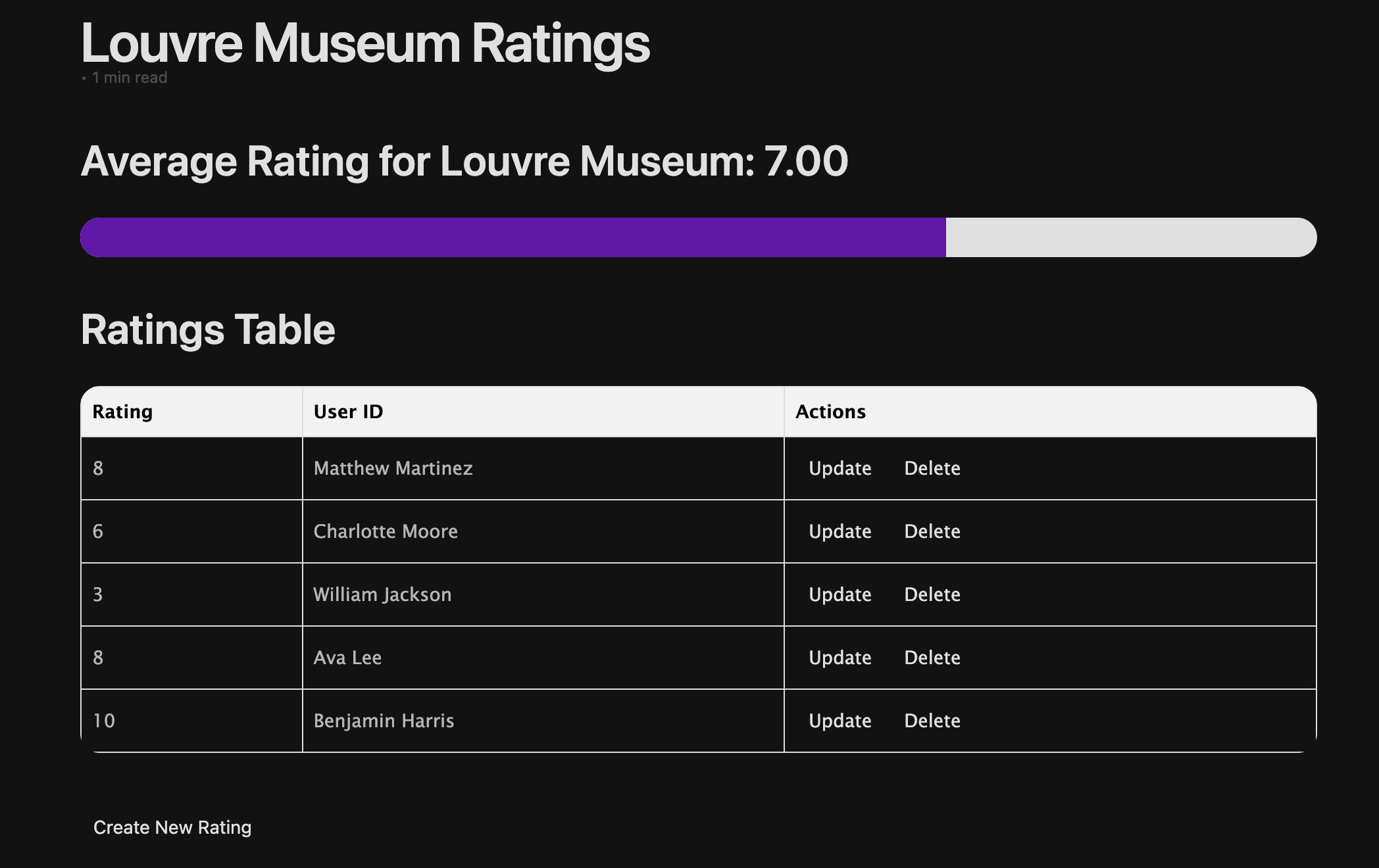
Displays on Frontend